Symptom questionnaire
For a fault or diagnostic booking, MechIQ can ask the customer a few quick questions about the symptom -- when it happens, what it sounds like, any warning lights. The answers feed the AI diagnosis and the technician's briefing, so the car is looked at with the customer's own description in hand.
You send it; the customer fills it in. It lives on the job's Job tab, in the Job Summary card.
Send it to the customer
Under Symptom questionnaire, press Send. Choose Text or Email -- the customer's preferred channel is picked for you, with the number or address it goes to underneath, and a channel they can't receive on (no email on file, a landline for a text) is greyed out with the reason. The box shows the exact message they'll get, link included. Press Send text or Send email.
The row then reads Sent by text to … with the time, and Send becomes Send again. The message is on the job's Comms tab and the send is on its timeline. If the customer has neither a mobile nor an email on file, the row says so and offers Copy link instead, so you can pass it on another way.
The page opens as A few quick questions under your garage's name. Send stays greyed out until the customer has answered at least one question, so an accidental tap can't send an empty form. When they send it the page reads Thanks -- that's a big help, with Change my answers underneath: until the job is finished they can open it again, change anything and send again -- the newest answers replace the old ones. Once they've answered, the row is replaced by their answers.
The questionnaire has its own link, separate from the job's tracking link: forwarding one never opens the other. Once the job is complete, collected, cancelled or marked as not arrived, the link shows the answers but takes no more changes, and gives your phone number. A questionnaire link sent before 15 October 2026 used the tracking link and no longer opens -- press Send again to send the new one.
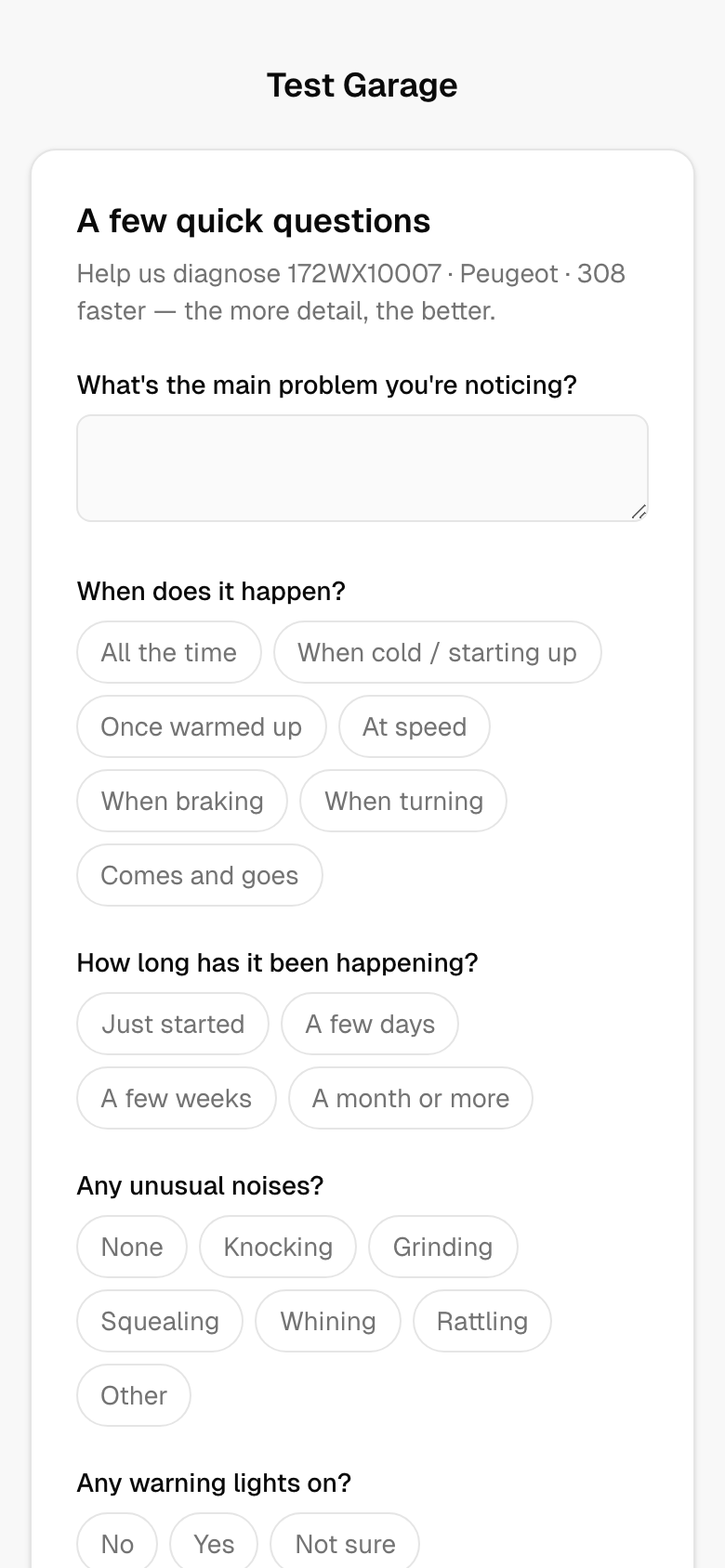 The questionnaire as the customer sees it.
What it asks
Seven questions, the same on the link and in the desk dialog:
- What's the main problem you're noticing? -- a short description in their own words.
- When does it happen? -- all the time, when cold / starting up, once warmed up, at speed, when braking, when turning, or comes and goes.
- How long has it been happening? -- just started, a few days, a few weeks, or a month or more.
- Any unusual noises? -- none, knocking, grinding, squealing, whining, rattling or other.
- Any warning lights on? -- no, yes, or not sure.
- Is the car safe to drive? -- yes drives fine, drivable but I'm worried, or no not safe.
- Anything else we should know?
When the customer is on the phone
If a job was booked for a diagnosis while the customer was on the phone, the same questions open in a dialog by itself the first time you land on the job, so you can key the answers while you have them. Multiple-choice questions are tap-to-select chips; the rest are short text boxes. Press Save -- or close it and send the customer the link instead.
Where the answers appear
Once answered, the Job Summary card shows Customer symptoms with each question and answer. If the answers came from the diagnostic enquiry form sent before the booking, the heading reads Customer symptoms -- from the diagnostic form sent before booking (see Diagnostic enquiry form).
The technician sees the same answers on their job, and the AI's diagnosis on the Work & approvals tab takes them into account. If the diagnosis asks a follow-up (for example Which axle is the noise from?), the tap-to-answer chips under Help MechIQ refine this feed the answer back in. Tapping one re-runs the diagnosis with your answer folded in -- the panel says Refining the diagnosis... while it works -- so the findings are replaced, not just annotated. Nothing you have priced or sent to the customer is touched.