The Actions Board
Actions in the sidebar (with a count badge) is your garage's shared to-do list for handoffs: the moments where work passes from one person to another. A technician finishes an inspection, so someone at the desk needs to price it. Parts arrive, so someone needs to give them to the technician. A customer declines work, so someone needs to ring them. Each lands on the board as a row the moment it happens and stays until the work is actually done.
This is different from the notifications bell. The board is the list of what someone must do. A bell (on the technician's screen and on the phone app) only tells a person that a row is waiting, and it goes when the row goes. Everyone on the front desk sees the same rows, so nothing depends on one person having read a message.
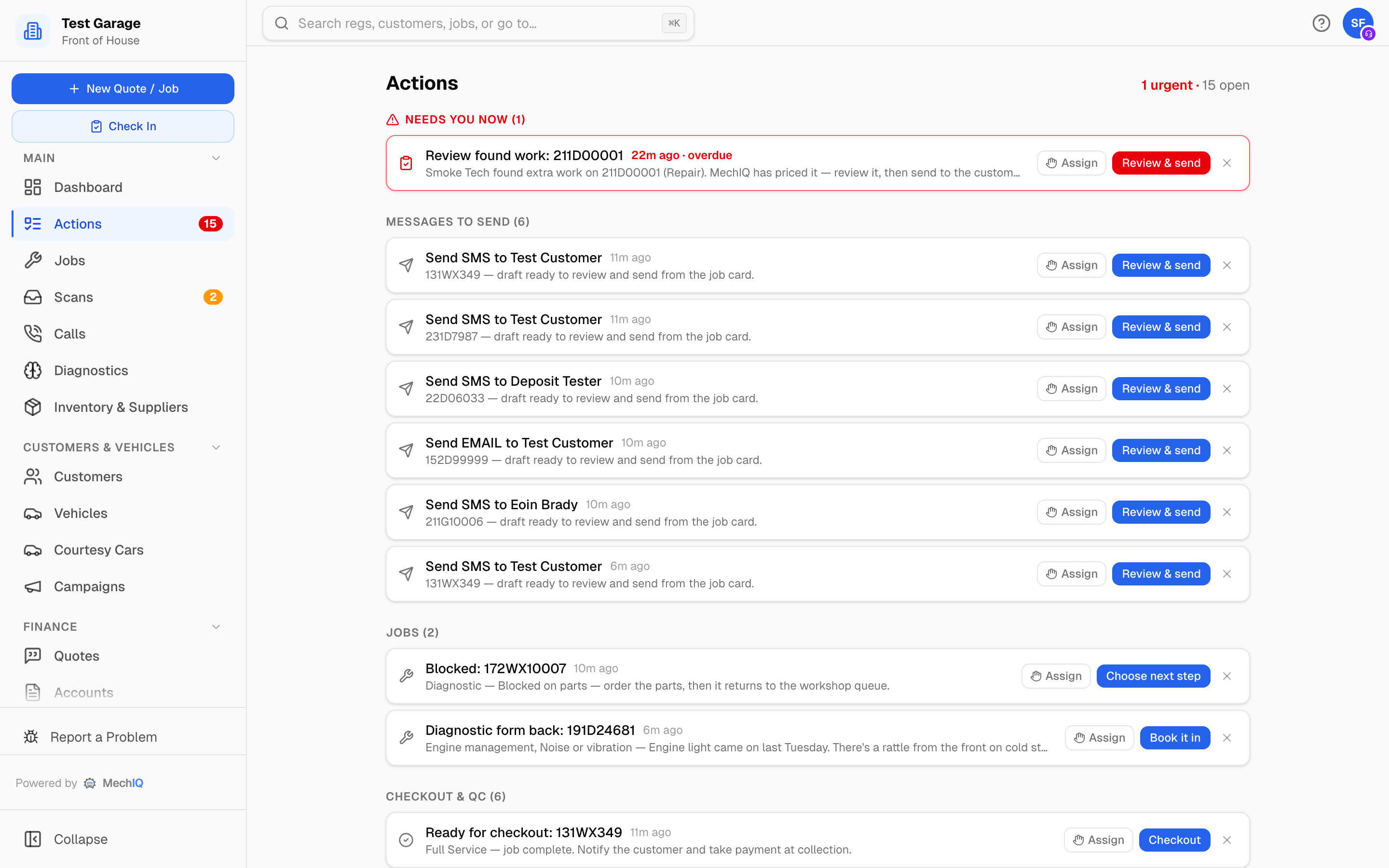 The board. Urgent rows sit in the red strip at the top; everything else is grouped by category, oldest first.
Urgent vs queued
The heading shows N urgent · N open. Every action is one of two kinds:
- Urgent: someone is physically waiting, for example a technician at the car with a wrong part, or a customer who has just declined. These sit in a red strip at the top and pop up on screen wherever you are.
- Queued: do it today. These sit below in category sections, oldest first: Approvals & quotes, Messages to send, Parts, Jobs, Reminders & follow-ups, Checkout & QC, Team (garage admin) and Getting set up (garage admin).
Each row's age turns amber as it nears its time limit. Past it, a row that alerts the garage admin says overdue in red; any other row says late. The primary button says the task and takes you straight to where it is done: Price it, Send for approval, Order parts, Call customer, Check out, Choose next step and so on. A job action opens the right tab of the job, and the tab shows in the address bar, so the browser's Back button returns to where you were. Clicking the row text opens the same place. A Customer replied row opens the customer.
One row per job task
A job has one row for each task, never one per order or per finding. Two parts orders arriving for one car make one Parts arrived -- 2 orders row; a priced inspection and a technician's second finding make one Extra work -- 1 to price, 1 to send row. The row's words and count follow what is left, and it closes when nothing is left. Doing one part of it (sending one package) never closes the rest.
Claiming an action
So two people do not ring the same customer, claim a row with Assign and pick Me or a teammate. The whole team then sees You have this or Sarah has this. If you cannot finish it, Hand back returns it to the pool. On an urgent pop-up, I've got it claims it in one tap. Assign is on the Actions page only, not on the rows at the top of a job page.
Actions close themselves
You do not tick actions off; doing the work removes them. Send the approval request and its package leaves Price extra work (the With customer chase takes over). Record the customer's decision, or the customer answers on their link, and every action for that package closes: Price extra work, a request that was not sent, With customer, and a hand-back blocked on the customer's authorisation. Every Send for approval row also has Record their answer, for when the customer said yes on the phone: it opens the package card at its Approve / Record decision buttons. Order the parts and Order parts for approved work closes. Check the car out and Check out closes. MechIQ also checks every row against the job again (every couple of minutes, and whenever you open the board), so a row whose work is done never stays.
A few types do their work from the row. Hand parts to technician on a Parts arrived row is the same as the job card's button: approved extra work whose parts are here goes onto the technician's plan, and the row closes. Clicking the row text only opens the job, so a stray click never hands anything over. An Over quoted time row offers Absorb (keep the customer at the quoted price) or Charge extra (the customer agreed to the full time). A Check out row offers Send the ready message while the message prepared at completion has not gone.
Mark handled is only on rows whose work MechIQ cannot see: a phone call (Customer declined, Unhappy customer, a car due a test), a decision (a finding you will not price, a part not used). With customer has no Mark handled: the customer's answer closes it. It asks what happened: Done by phone, The customer contacted us or Not needed any more. On Price extra work, Mark handled closes only the findings nobody will price, and shows only when the row has one; a package still to send stays until you send it or record the decision. There is no "no action needed" close on any other row: it closes when its work is done. Every action on a job also closes when the job is collected or cancelled.
The pop-ups
When an urgent action lands, a red pill appears in its own row under the top bar of every front-desk screen (it never covers the page) with a chime and a brief pulsing halo, and stays until it is dismissed or handled. With one urgent action, the pill's button says the task (for example Price it) and opens that job at the place it is done; × hides the pill until the next urgent arrival (the row stays on the board). Several urgent items collapse into N urgent actions, and Open goes to the board. In another browser tab, the tab title flashes Urgent until you come back and shows (N urgent) while anything urgent is open.
Quieter arrivals show a short white N new actions -- View notice in the same spot for a few seconds. While the red pill is up they do not show anywhere else (they wait on the board), so there is only ever one notice on screen. The red pill counts urgent rows only.
Garage admins only get the pop-up, and the red pill, for actions that have escalated to them, not for every arrival.
Escalation to the garage admin
Each urgent action type has an escalation time, and so do four queued types: Awaiting quality check, Parts saved for later, Order parts for approved work and Handed back -- choose next step. If a row sits unclaimed past its time, the garage admin is alerted once, so nothing waits on a busy desk unnoticed. The alert goes away when someone claims the row or the work is done. A car escalated from the bay view (Car needs attention) alerts the garage admin at once.
The time counts only while the garage is open, and the alert goes out only during opening hours. A customer who declines online at 10pm does not wake the owner at 10.30pm; the clock starts when you open.
Otherwise an action rings only the people it is for, once: desk actions ring the front desk (or the garage admin, when the garage has no front-desk user), and a Leave request rings the garage admin only. The garage admin is never rung for desk work that is on time.
On the job page
Open a job and its outstanding rows appear at the top of the Job tab under Open actions for this job, so you can see what is due on that car without going back to the board.
What lands on the board
Every action type has two names, and they are not the same string:
- On the board, a row is written fresh for the car or person in front of you -- Extra work -- 1 to price, 1 to send: 231D7987, Blocked: 191D10001, Check out: 231D7987. That is the only name you see while working.
- In Settings, the same type is listed under its generic name -- Price extra work, Handed back -- choose next step, Message not sent. Those names appear nowhere but the Escalation times list.
| Name in Settings | How the row reads | Category | Button | Closes when |
|---|---|---|---|---|
| Price extra work (urgent) | Extra work to price: 231D7987, Extra work priced -- send for approval: 231D7987, or Extra work -- 1 to price, 2 to send: 231D7987 | Approvals & quotes | Price it (something to price); Send for approval + Record their answer (all priced) | Each Extra work item is sent or decided, or its lines are all marked not needed |
| Customer declined (urgent), raised only by a decline on the customer's link | Customer declined extra work: 231D7987 | Approvals & quotes | Call customer | Mark handled, or a new request goes out |
| Job over quoted time | Over quoted time: Full service | Approvals & quotes | Absorb or Charge extra | You choose Absorb or Charge extra |
| Technician: task not needed | Technician says not needed: Re-gas air conditioning, with the technician's reason | Approvals & quotes | Remove the charge (it asks first) or Keep it | You remove the labour line (here, on the job's What needs doing, or with the bin on Parts & Labour — the same confirm everywhere), you keep it, or the technician puts the task back |
| With customer | With customer: 231D7987 (or With customer -- 2 approval requests) | Approvals & quotes | Chase (opens the package card, where you record the decision) | The customer decides |
| Quote accepted online | Quote accepted -- book it in: 2019 Toyota Yaris | Approvals & quotes | Book it in (opens the quote) | The quote is booked, or Mark handled |
| Message not sent | Aoife Byrne's booking request lapsed -- tell them | Messages to send | Open and send | That message is sent |
| Customer replied | Reply from Aoife Byrne | Messages to send | Reply (opens the customer) | You reply to the customer, from anywhere |
| Part problem at the car (urgent) | Wrong part: Front brake pads set -- 231D7987 | Parts | Sort it | The replacement is sorted |
| Find the right part | Part match rejected: Front brake pads -- 231D7987 | Parts | Find the part | The line is matched again |
| Part not used -- check the bill | Part not used: Oil filter -- 231D7987 | Parts | Check the bill | Mark handled |
| Order parts for approved work | Order parts for approved work: Brakes and wipers | Parts | Order parts (opens the job's Order parts box) | Every part for it is in stock or ordered |
| Parts saved for later | Parts saved for later: PO-2026-0012 | Parts | Order parts | The order is sent (or cancelled) |
| Hand parts to technician | Parts arrived: 231D7987 (or Parts arrived -- 2 orders) | Parts | Hand parts to technician | You hand the parts over (here or on the job card) |
| Parts arrived -- book the car back in | Parts arrived -- book the car back in: 231D7987 | Parts | Book it back in | The car comes off hold |
| Upcoming booking -- parts not ready | Parts not ready: 231D7987 | Parts | Sort parts | The parts are secured or saved for later, the car is checked in, or the day passes |
| Received invoice -- set up supplier | Set up supplier: Euro Car Parts | Parts | Set up supplier | The supplier is linked |
| Supplier invoices to import | 2 supplier invoices to import | Parts | Import (opens Accounts) | The inbox is empty |
| Scan may be for the wrong vehicle (urgent) | Scan may be for the wrong vehicle: 231D7987 | Jobs | Check the scan | The scan is reassigned |
| Handed back -- choose next step | Blocked: 231D7987 | Jobs | Choose next step | The job leaves With the desk |
| Car needs attention | Car needs attention: 231D7987 | Jobs | Open the job | Mark handled, or the job ends |
| Online booking to confirm | Full service -- 231D7987, Thu 2 Oct morning | Jobs | Confirm | You confirm or decline, or the car is checked in |
| Check the customer's details | Check customer details for 231D7987 | Jobs | Check details | Mark handled |
| Diagnostic form back | Diagnostic form back: 231D7987 | Jobs | Book it in | The car is booked |
| Jobs need a new tech | 3 bookings rehomed -- 1 still needs a tech | Jobs | Open the board (the Tech Board on that day) | The jobs are re-homed |
| The board moved work | 231D7987 moved to Fri 3 Oct -- tell the customer | Jobs | Tell the customer (opens the job's Comms tab) | The day comes, the job moves again or ends |
| Capacity impact -- review the day | Thu 2 Oct still over capacity -- ... | Jobs | Review the day (the calendar on that day) | The day passes or the impact ends |
| Couldn't rebook -- pick a date with the customer | No slot found -- Aoife Byrne | Jobs | Rebook (the Tech Board on that day) | The job is rebooked, arrives or ends |
| Deposit paid, booking already cancelled | Deposit paid for a cancelled booking | Jobs | Re-book or refund | The customer is re-booked or refunded |
| Cars due a test -- call | 4 cars due a test to call -- 6 more cars texted automatically | Reminders & follow-ups | Open Follow-ups | Every car on the list is booked or called |
| Missed calls to ring back | 2 missed calls to ring back | Reminders & follow-ups | Ring back (opens Calls) | Every missed call is dealt with |
| Declined work -- follow up | Declined work follow-up | Reminders & follow-ups | Follow up | The vehicle is booked in, or Mark handled |
| Unhappy customer -- call back | Aoife Byrne rated us 4/10 -- call them back | Reminders & follow-ups | Call the customer | Mark handled |
| Awaiting quality check | Awaiting QC: 231D7987 | Checkout & QC | Run QC | QC passes or fails |
| Check out | Check out: 231D7987 | Checkout & QC | Check out (and Send the ready message while it has not gone) | The car is collected |
| Leave request | Leave request: Dave Murphy | Team (admin) | Review | The leave is decided |
Cars due a test
When an MOT, NCT or CVRT comes due, MechIQ texts the customer automatically (when your garage has test reminders switched on and the customer agreed to texts). The board has ONE row for the garage, N cars due a test to call, for the customers to ring: the ones MechIQ could not text, and the ones texted a week ago who have not booked. Open Follow-ups shows each car with Book them in and Called. The row also says how many more were texted automatically and are waiting for their answer.
Settings
Garage admins configure the board under Settings → Notifications → Actions queue: the Sound on urgent actions toggle, the Parts hand-off location shown on every parts hand-off row, and the per-type Escalation times (blank means never escalate). The escalation list names each type generically -- the left-hand column of the table above -- so match it there rather than against what the board says.
Related: Found work and the technician handoff · Customer approval · Notifications