Marketing Campaigns
Campaigns (sidebar, under Customers & Vehicles) sends a bulk SMS or email to a group of customers -- a winter-check offer, a service-due nudge, a "we miss you" to lapsed customers. NCT and MOT reminders are not a campaign: the automatic test reminder (Settings -> Customer Messaging) already texts every car coming due.
Campaigns only ever go to customers who have given marketing consent. When nobody in the audience has consented, the form says how to record it: ask the customer, then open them in Customers -> Account -> Marketing consent. Customers who tick the box on your online booking form are recorded automatically. See Marketing Consent.
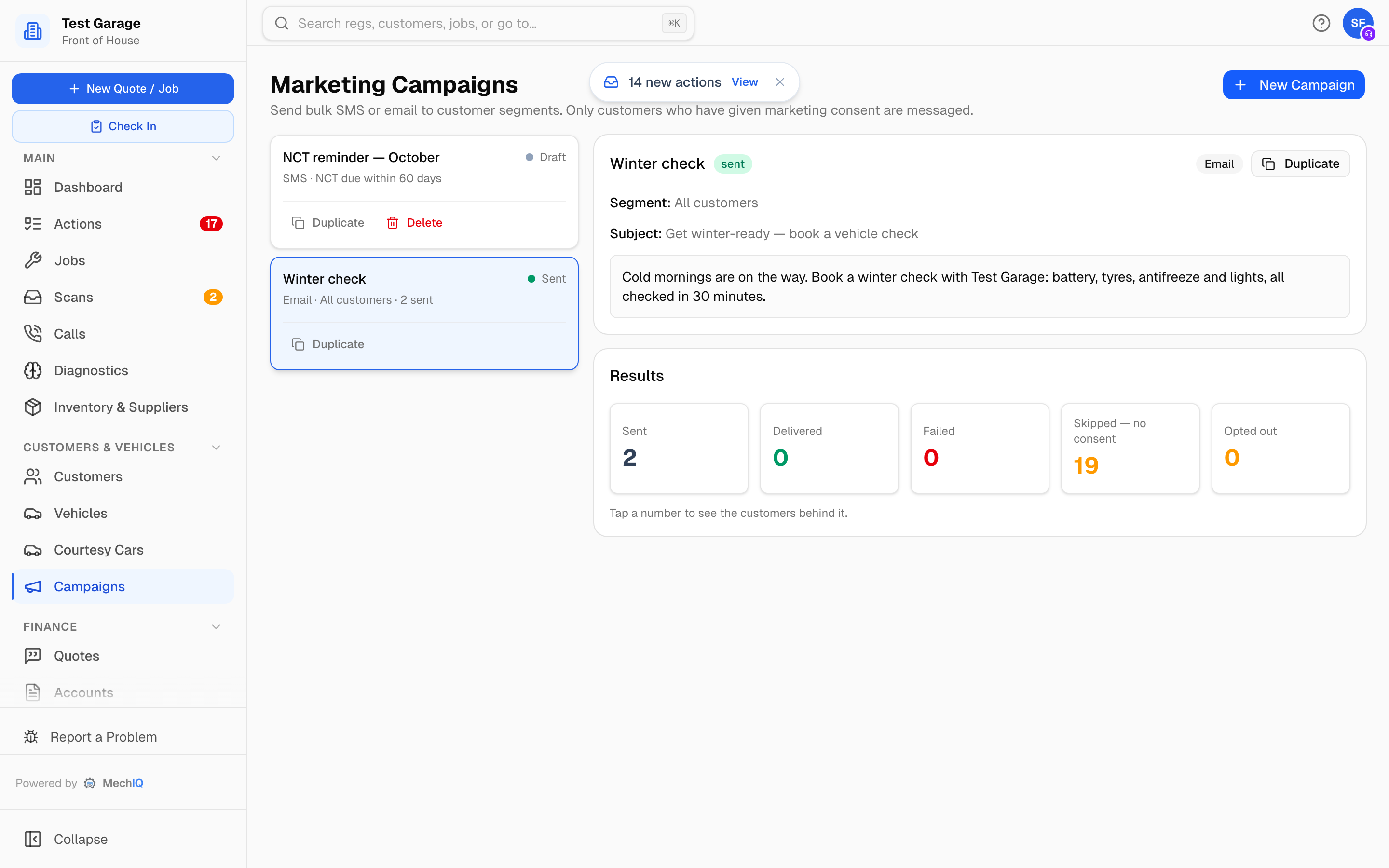 A sent campaign with its results funnel.
Create a campaign
- Click New Campaign.
- Pick the Channel -- SMS, Email or SMS + Email. With both, each customer gets it on their preferred channel, or whichever contact detail you have.
- Optionally start from a template: Service due, Winter check, Pre-holiday check, We miss you. A template fills in the name, segment and message (and the email subject). It does not change the channel you picked; edit anything before you send. No template asks the customer to reply: a text from your sender name cannot receive one.
- Give it a Campaign name.
- Pick the Audience segment:
- All customers
- NCT due soon / MOT due soon -- tests falling due within the next Due within (days) (30 by default). Already-overdue tests are not included. The form warns that the automatic test reminder already texts these customers, so a campaign to them is a second message.
- Lapsed customers -- no job in the last Not seen for (months) (12 by default), plus customers who have never had a job.
- Write the Email subject (email only) and the Message. Campaign messages are sent as written -- no names are filled in. Don't ask customers to reply: a text from your sender name has no number behind it, and email replies don't come back into MechIQ. A message that says reply, text us back or reply YES shows an amber note -- This message asks the customer to reply, but … -- and Create campaign stays off until you change it (for example to Call us on 01 234 5678). MechIQ refuses the same wording when you send, too.
- Check the grey box under the message: Each text ends with / Each email ends with. MechIQ adds your garage name and the customer's own opt-out link to the end of every campaign message. You cannot remove it -- the law requires a free, simple opt-out in every marketing message.
- Click Create campaign.
While you type, the form shows ≈ 40 customers will receive this and warns how many matched customers have no consent.
The Recipients card and the consent gate
A draft campaign shows a Recipients card with four figures, updated as you change segment or channel:
- Matched segment -- customers in the segment.
- Will be messaged -- matched, consented, and reachable on the channel.
- Excluded -- no consent -- matched but no marketing consent. They are never messaged.
- Unreachable -- no contact detail for the channel (no mobile for an SMS campaign, say).
To reach the excluded customers, record their consent on their record first, then send.
Send
Click Send to 40 customers by text (or by email). The same "What they'll get" step as every other message to a customer opens:
- How many get it, and Will not get it -- who is left out and why (did not agree to marketing messages; no number or address for the channel).
- Show the message one customer will get -- the exact words for one customer, with your garage name and the opt-out line. Their own opt-out link shows as (link) and is made when you send. With SMS + Email you can look at the text and the email in turn.
Nothing is sent until you click Send now. A sent message cannot be called back. The send runs in the background, so the page stays usable; the campaign shows Sending and then Sent.
Results
A sent campaign shows a Results funnel: Sent, Delivered, Failed, Skipped -- no consent and Opted out (customers who were sent it and have since withdrawn consent). Click any figure to see the customers behind it, with the reason for any failure -- a bad number, a bounced email, or outbound SMS switched off for the garage.
Duplicate and delete
Duplicate copies any campaign as a new draft (Winter check (copy)) ready to edit and send again. Delete removes a draft; sent campaigns are kept.
Opt-outs
Every campaign message ends with your garage name and a short opt-out link for that customer. The customer opens the link, presses Stop marketing messages, and their consent is withdrawn straight away -- no login, no call to you. Opening the link alone changes nothing. Their Account tab then says Withdrawn
MechIQ also handles a STOP reply (or STOPALL, UNSUBSCRIBE, CANCEL, END, QUIT) by withdrawing consent automatically, on a channel the customer can reply on. Texts from your sender name cannot receive a reply -- that is why every message carries the link.
You can still withdraw consent yourself on the customer's Account tab (see Marketing Consent).
Tips
- Keep an SMS under 160 characters or it goes as several texts.
- A big Excluded -- no consent number is a sign to ask for consent at booking and collection.
- Use the Failed drill-down after a send to clean up bad numbers and addresses on customer records.