Duplicate Customers
The same person sometimes ends up on file twice -- once as 087-100-2000 and again as +353 87 100 2000, or imported with a slightly different spelling. MechIQ flags these for you to review. Nothing is ever merged automatically.
The review bar
When MechIQ finds possible duplicates, an amber bar appears on the Customers page between the queues and the search box: 11 possible duplicate customers to review. Click it to open the list. If there is nothing to review, the bar is not shown.
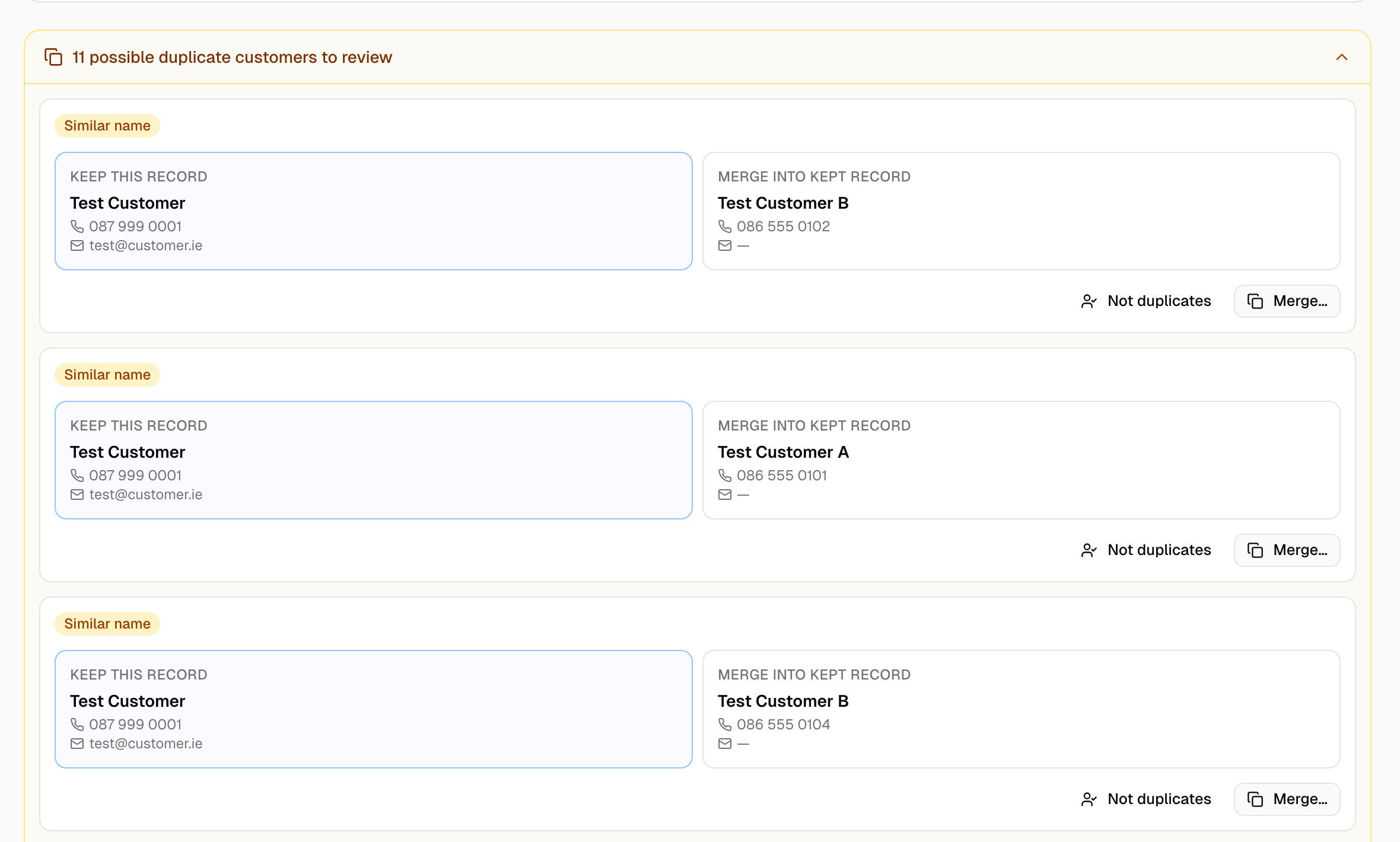 Each pair shows both records, which one will be kept, and the reason it was flagged.
Why a pair is flagged
- Same phone number -- the numbers match once dashes, spaces and the +353 / 087 prefix are ignored.
- Same email -- the addresses match ignoring case.
- Similar name -- identical or nearly so.
Strongest signals are listed first. If either record is a trade account you also see Involves an account customer -- check carefully, because account terms and billing follow whichever record is kept.
A shared car is deliberately not a signal. Two contacts on one vehicle is usually a household.
MechIQ also stops a duplicate at the door: a new customer with a phone number or email already on file is refused with A customer with phone '...' already exists. That is why the pairs here are format variants, not exact matches. Two different customers an import brought in on one shared number aren't duplicates either: the second shows it as a shared number (see Customers). Unassigned vehicles (imported) is never flagged and can't be merged -- move each of its vehicles to its customer instead.
Not duplicates?
Father and son sharing the house phone, two drivers with the same name -- click Not duplicates. The pair disappears and is not flagged again.
Merge a pair
- Each pair shows the two records side by side. The one marked Keep this record survives; the other says Merge into kept record. MechIQ suggests keeping the older record, which usually owns the history. Click the other card to swap.
- Click Merge....
- Read the confirmation: Move everything from A onto B? Vehicles, jobs, invoices and messages all move; this can't be undone.
- Click Merge.
Afterwards everything that was on the duplicate -- vehicles, jobs, invoices, messages, payments -- belongs to the kept record. If the kept record was missing a phone, email or address that the duplicate had, it is filled in. The duplicate is archived and renamed (merged) so old paperwork can still be traced; it is never deleted.
Tips
- When a pair involves an account customer, check with your garage admin first.
- Clear the bar at a quiet moment each week. Duplicates split service history and make a customer look like two lapsed customers in a campaign.