Supplier catalogues and your own pricing
Where a supplier has shared their catalogue with MechIQ, every MechIQ garage that buys from them gets it automatically -- the part numbers, the descriptions and the prices -- without anyone uploading a spreadsheet.
If you've negotiated better rates than the standard, you upload your own price list on top. Your prices replace the standard ones for the parts you've agreed, and nothing else changes.
Which suppliers MechIQ already covers
A supplier here has shared their catalogue with MechIQ, and may also support ordering from inside MechIQ. This list is live, so it's always the current one:
{{supplier-catalogues}}
More are added as suppliers agree. If yours isn't here yet you can still upload their price list yourself — see below — and everything on this page works the same way.
You don't have to switch anything on. If your supplier's name matches one we hold a catalogue for, the link happens by itself — "Top Part", "Top Part Ltd" and "Yenom Ltd t/a Top Part" all find the same catalogue.
Choosing which factors price your parts
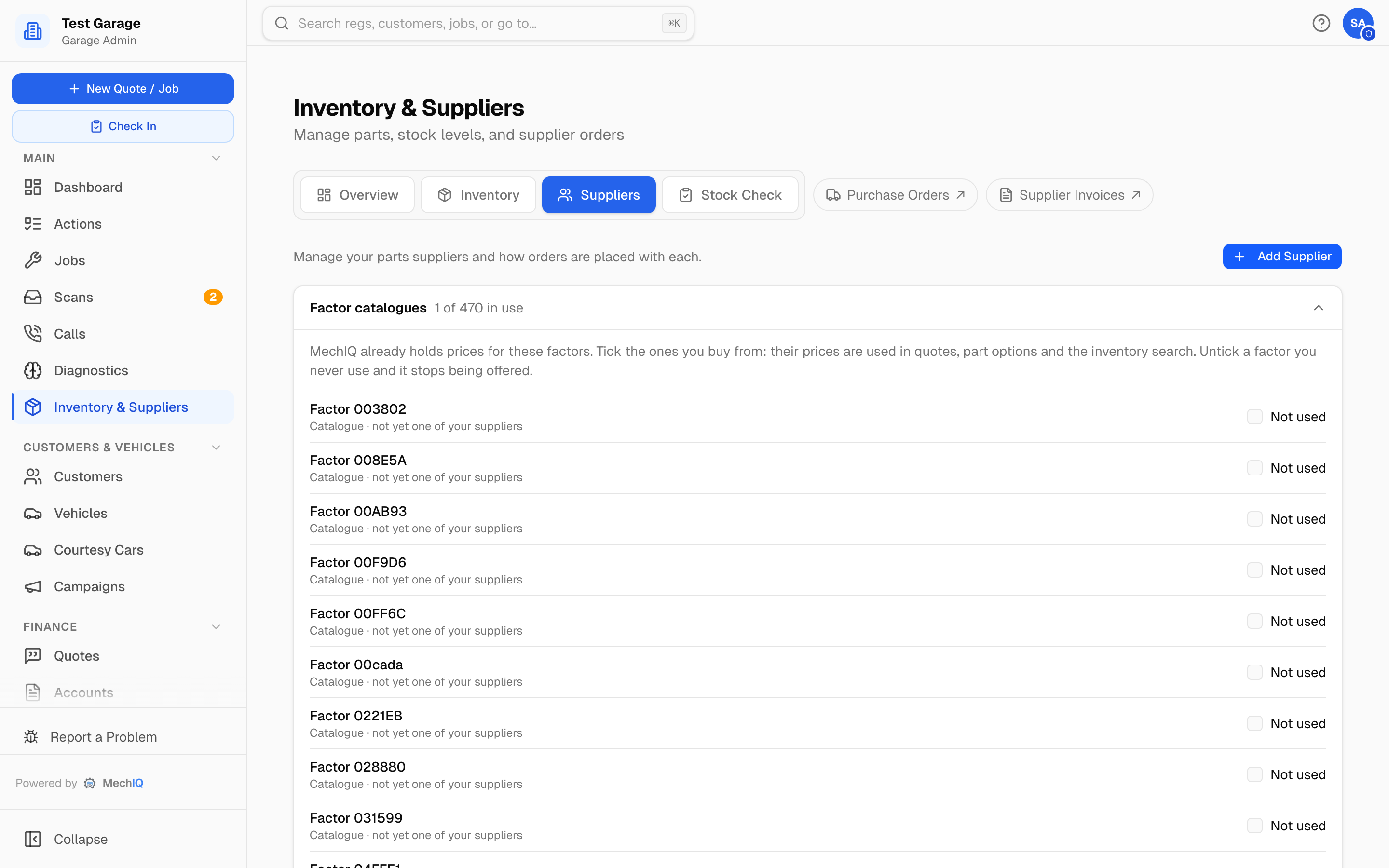
On Inventory & Suppliers → Suppliers, the Factor catalogues card lists every factor MechIQ holds prices for, each with a tick. Ticked (In use) means that factor's prices are used when MechIQ prices a quote, offers part options or answers the inventory search. If you never buy from a factor — you can't, or you won't — untick it and it stops being offered, so you're never shown a price you can't actually get. Ticking a factor you don't yet have as a supplier adds them for you. Unticking keeps the supplier and your order history; only the pricing changes.
The same switch is on the supplier itself: Edit → Ordering → Price list — Prices from Top Part's published price list. It appears only for a supplier whose name matches a list MechIQ holds; for every other supplier there is nothing to set.
The two prices on every part
Click Catalogue on a supplier (on the Suppliers tab, or the Catalogue tile on their page) and each part shows:
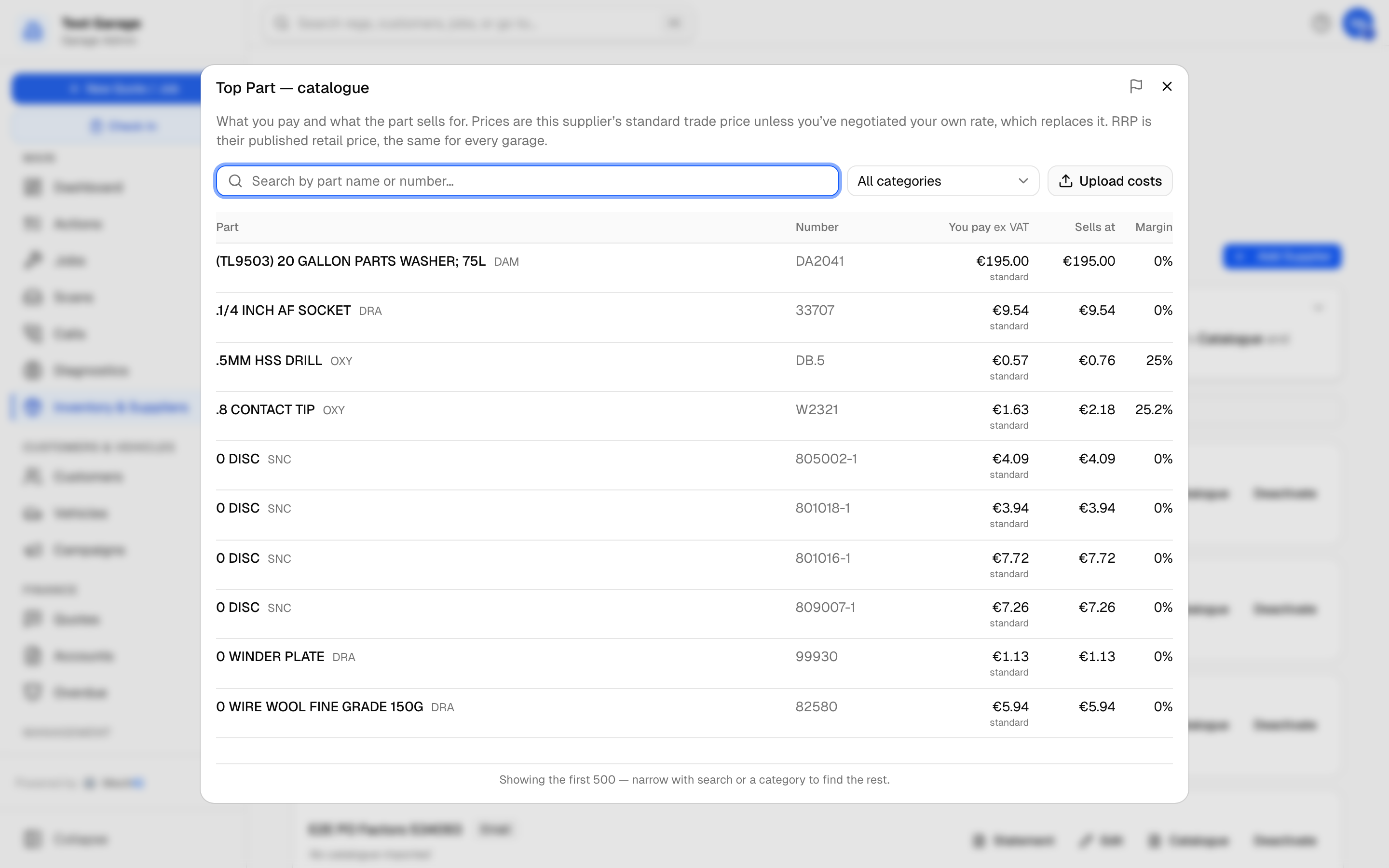
- You pay (ex VAT) — what the part costs you, before VAT.
- Sells at — the supplier's RRP, their published retail price.
- Margin — the gap between the two.
The "You pay" figure is labelled so you always know which price you're looking at:
- standard — the supplier's normal trade price, the same for every garage.
- your rate — a price you've negotiated, which we're using instead of the standard.
Where you have your own rate, the standard is shown underneath it, so you can see what your agreement is actually worth. A part that only exists in your own price list carries a yours only badge.
Uploading your own prices
If your supplier has given you a price list — usually because of the volume you buy — upload it and MechIQ will use your prices instead of the standard ones.
- Go to Inventory & Suppliers → Suppliers and find the supplier in the list.
- Click Catalogue on their row, then Upload costs. (The Catalogue tile on the supplier's own page opens the same dialog.)
- Pick your file. It must be a CSV — if the supplier sent a spreadsheet, open it and Save As → CSV first.
You don't need to reformat it. MechIQ reads the column names suppliers actually use, so their export usually goes straight in:
| We need | Columns we recognise |
|---|---|
| Part number | Part Number, Product Number, Product Code, SKU, Code |
| Description | Product Name, Description, Name, Item Name |
| Your price | Cost, Net Price, Trade Price, Unit Cost, Buy Price |
Optional columns are picked up if they're there — brand or line code, category, a longer description, and vehicle fitment (make, model, year from/to, engine code). If a column can't be matched, MechIQ tells you which one it needed and lists the columns your file actually had, so you can see what to rename.
Re-uploading is safe. Parts already in your list are updated; parts not in the file are left alone, so a partial price list won't wipe the rest.
Your prices stay yours
The prices you upload are private to your garage. They are never shared with other MechIQ garages, and they are never added to the supplier's shared catalogue. What you negotiated is your business.
What MechIQ tells you after an import
Rows it couldn't use. If a row has no part number, or a price it can't read, it's counted and explained rather than quietly dropped — so an import that brought in nothing never looks the same as a file that was empty.
Parts priced below cost. If your file says a part costs more than it retails for, MechIQ flags it. That's almost always an error in the file — a pack size mixed up (a price for a 20-litre drum against the RRP for a 5-litre), or a decimal in the wrong place. It's worth sending back to your account manager to confirm which price is right. The parts still import; it's a question, not a rejection.
A part costing exactly its RRP isn't flagged — that's normal, since your own margin goes on top of what you pay.
How this affects what you charge
Adding one of these parts to a job charges the customer the higher of:
- the supplier's RRP, or
- your cost plus your margin.
So you never undersell a part you bought cheaply, and you never drop below your own margin on a part that was expensive to buy. If we don't have an RRP for a part, it's simply your cost plus your margin, as it always was.
Duplicate suppliers
An imported ledger usually carries the same trader more than once -- a slightly different spelling, or the same merchant under two account codes. Left alone, each row holds half the story, so neither page tells you what you actually buy from that trader.
MechIQ spots rows that look like the same supplier and offers them for merging in a possible duplicate suppliers card at the top of the Suppliers tab. It never merges anything on its own, and it isn't a front-desk job -- only a garage admin sees the card and can merge. Two rows that look alike can genuinely be two accounts.
Press Keep name on the row you want. Everything from the duplicate -- orders, invoices, parts and spend -- moves onto the row you keep, and the old name and account code are kept as aliases. That matters: a future invoice or price list arriving under the old name still matches, so the merge doesn't quietly recreate the duplicate next month.
Check the two rows really are one trader before merging. It cannot be undone from the app.
Frequently asked
Do I have to upload anything to use a supplier's catalogue? No. If the supplier has shared their catalogue, you have it already. You only upload if you've negotiated your own prices.
What if I upload a price list and later get better rates? Upload the new file. It overwrites the parts it contains and leaves the rest as they were.
Can other garages see what I pay? No. Only the supplier's own standard prices and RRP are shared. Your negotiated prices never leave your garage.
My supplier isn't listed — can I still use MechIQ's parts features? Yes. Upload their price list on their supplier page exactly as above, and everything on this page works the same way. The shared catalogue just saves you that step.
How do I get my supplier added to the list? Tell us who they are. Suppliers join by agreeing to share their catalogue or by connecting their ordering system to MechIQ — the more garages asking for a particular factor, the easier that conversation is.