Ask your garage a question in plain words
Connect the AI assistant you already use — Claude, ChatGPT or another assistant that supports MCP — to MechIQ. Ask how the fortnight went, who owes what or what is booked tomorrow, and it answers from your garage's own figures. Read-only, and off until you switch it on.
Join the WaitlistHow did gross profit for the last two weeks compare with the two weeks before?
Looked up in MechIQ: sales report, 19 Oct – 1 Nov, with the two weeks before
Gross profit was €11,711.35 for 19 Oct – 1 Nov, up €2,208.30 (23%) on €9,503.05 for 5–18 Oct.
- Sales ex VAT: €16,389.85 against €12,999.55, from 58 invoices against 42.
- Labour sales: €10,012.50 against €8,160.00.
- Profit on parts: €1,698.85 against €1,343.05.
Which account customers owe over €500, and for how long?
Looked up in MechIQ: aged debtors
Three account customers, inc VAT:
- O'Brien Deliveries — €4,659.18 over 10 invoices; the oldest is 33 days.
- Murphy's Taxi Fleet — €4,085.21 over 11 invoices; the oldest is 53 days.
- Brennan Construction Ltd — €673.09 over 4 invoices; the oldest was raised today.
What's booked tomorrow, and is anything waiting on parts?
Looked up in MechIQ: bookings for Thu 5 Nov, jobs on hold
Three jobs, 8 hours booked for Thursday:
- 13:00 — Ford Transit Custom, oil leak repair (1.5 h)
- 14:00 — Volkswagen Golf, full service (2 h)
- 15:00 — Toyota Corolla, timing belt (4.5 h)
None of tomorrow's jobs is waiting on parts. One job already in is: the Peugeot 3008 EGR valve (J-0011), with parts expected Friday 6 Nov.
The same figures as your reports
Sales, gross profit, who owes what, bookings, jobs, stock and supplier orders. The assistant asks MechIQ, and MechIQ answers with the numbers your own reports show.
Read-only
It can't change a job, send a text or email, book anything or take a payment. It reads, and that is all.
Admin and front desk only
Each person connects with their normal MechIQ sign-in and sees what their role sees. Reports and financials are for garage admins. Technicians can't connect.
You choose what it sees
When you connect, you tick the kinds of data to share — jobs, customers, money, reports and so on. Anything you leave unticked, it can't see.
Off until you switch it on
A garage admin turns it on in Settings. Disconnect one assistant at any time, or switch the setting off to disconnect them all at once.
Every question logged
Settings lists each question: when, who, what kind and how many results. Names, phone numbers, registrations and searches are logged as [redacted].
How it connects
Three steps, all in screens you already know. Your garage has its own MechIQ address to give your assistant.
Step 1
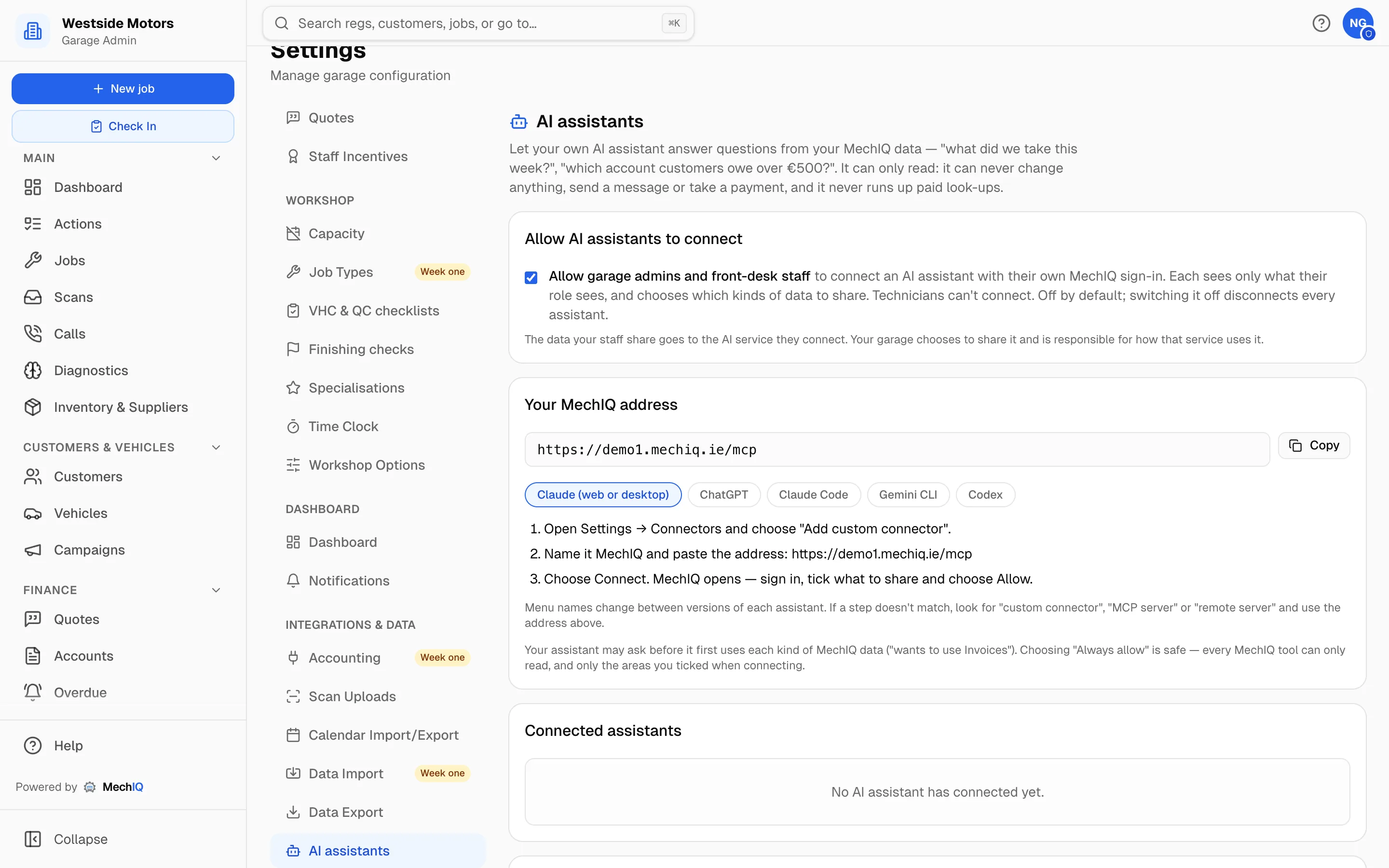
Switch it on and copy your address
In Settings → AI assistants, a garage admin ticks Allow AI assistants to connect and saves. The page shows your garage's MechIQ address with a Copy button, and the steps for Claude, ChatGPT, Claude Code, Gemini CLI and Codex.
Step 2
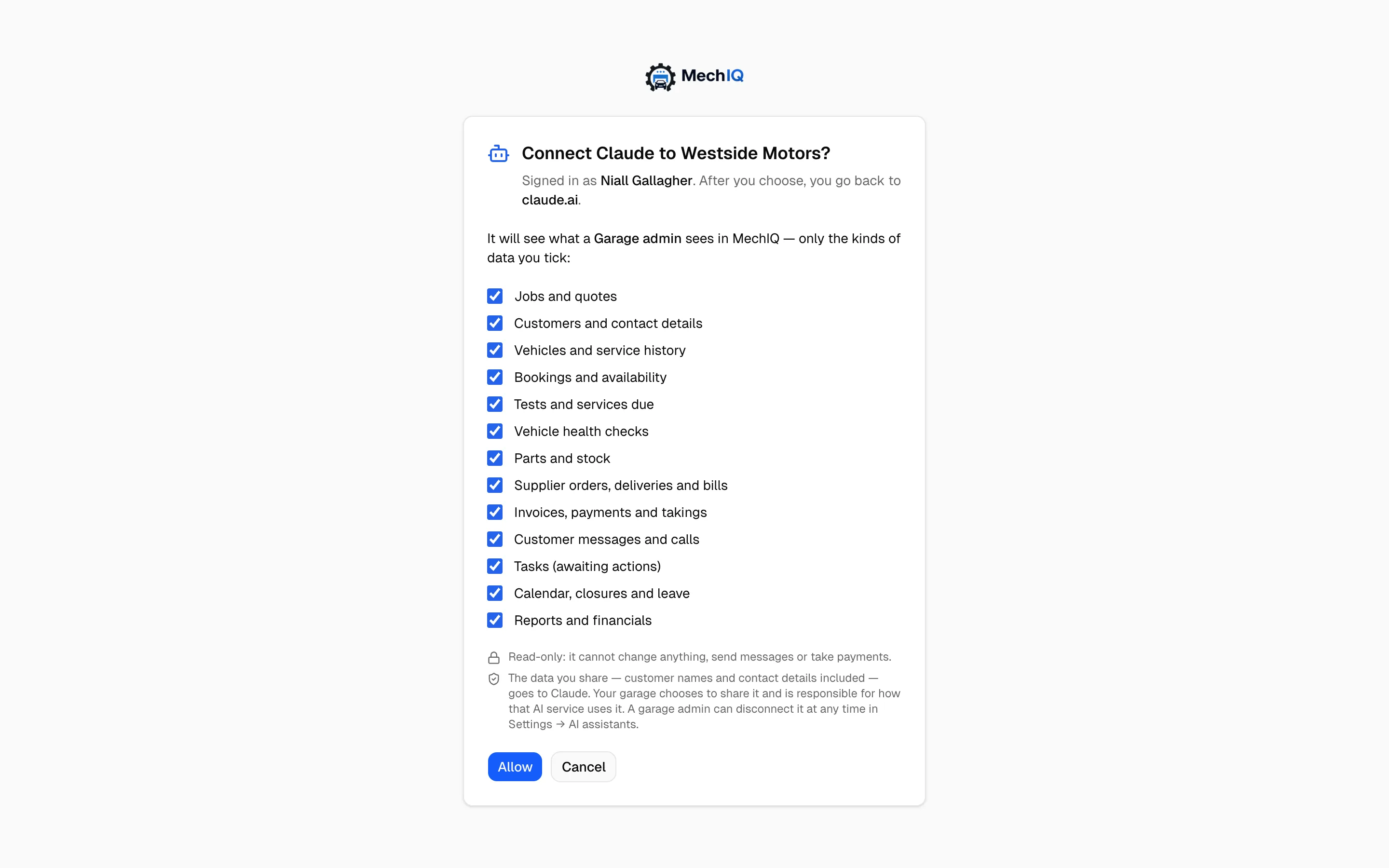
Sign in and tick what to share
Your assistant opens MechIQ's normal sign-in for your garage. MechIQ then shows which assistant is asking, the role it will act as and the kinds of data it can read. Untick anything you don't want to share, then choose Allow.
Step 3
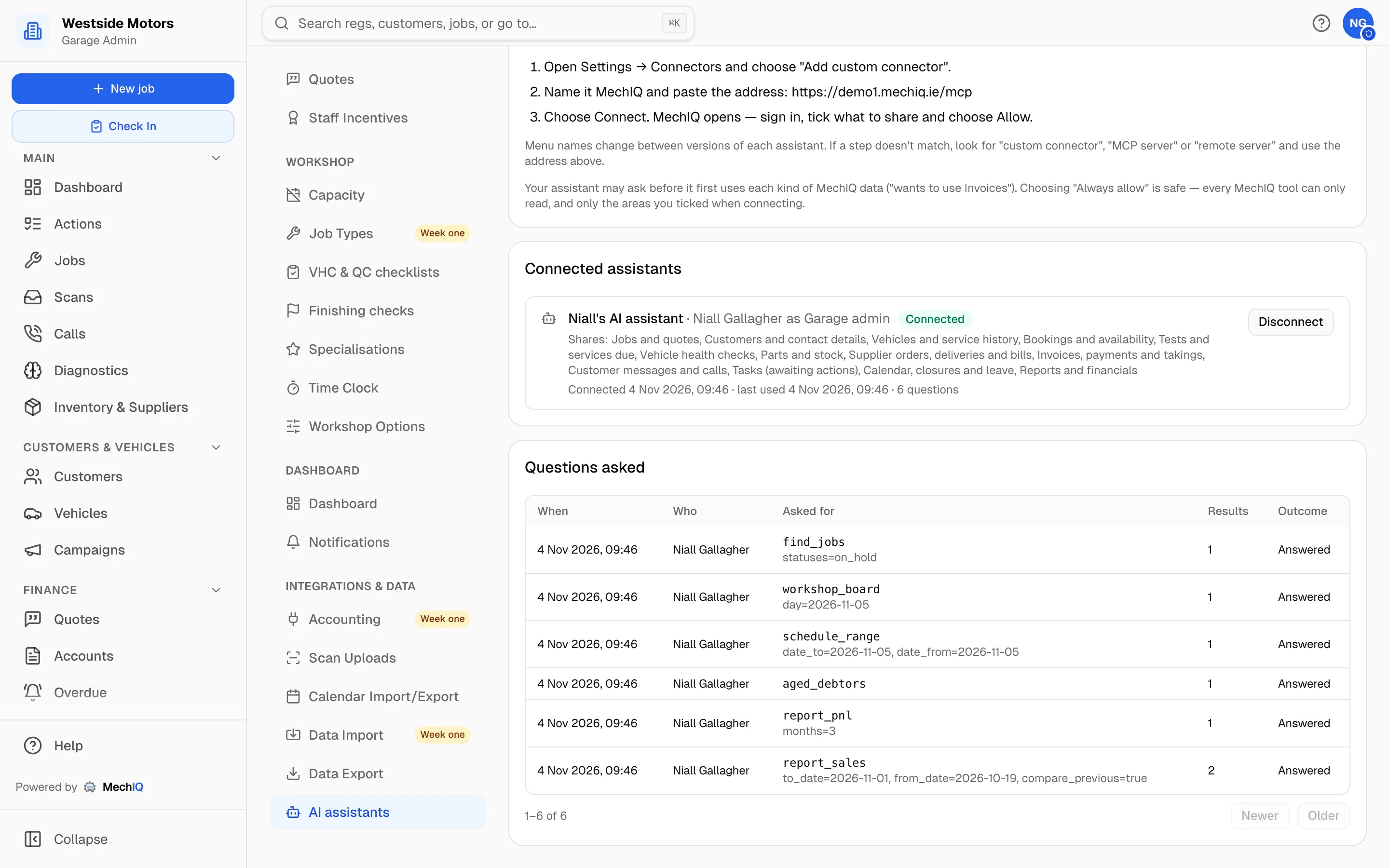
Ask — and see every question
Ask in your own words. Settings shows each connected assistant, who connected it, what it shares and when it was last used, with every question it asked underneath. Disconnect ends it at once.
The answer without building the report
The figures are already in MechIQ. What takes time is finding the right report, setting the dates and reading across the columns — usually at the end of a long day. If you already use an AI assistant, it can do that part for you: one question, and the answer comes from your own numbers. MechIQ's reports stay where they are for when you want the full picture.
AI Assistant FAQ
Which AI assistants can connect?+
Any assistant that supports MCP remote servers with sign-in. MechIQ gives set-up steps for Claude (web and desktop), ChatGPT, Claude Code, Gemini CLI and Codex.
Does it cost extra?+
No. It is included in every MechIQ plan. The assistant runs on your own AI subscription, and MechIQ never starts a paid look-up or a MechIQ AI feature to answer it.
Can the assistant change anything in MechIQ?+
No. It is read-only. It cannot change a job, send a text or email, book a job or take a payment.
Can technicians connect an assistant?+
No. Only garage admins and front-desk staff can connect. Reports and financials are for garage admins only.
Where does the data go?+
To the AI service you connect, and only the kinds of data you tick when you connect. Your garage chooses to share it and is responsible for how that service uses it, as with any other tool you give customer data to. Check your AI provider's data settings.
How do I stop it?+
Disconnect one assistant in Settings → AI assistants, or switch the setting off to disconnect every assistant at once.
Step-by-step set-up: Connect your AI assistant in the help centre.
More of what MechIQ does
Reporting
Which jobs actually made money
Invoicing & Accounts
Money in, money out, one place
AI Quoting
The quote is written before the kettle boils
AI Diagnostics
Four ways to ask, one straight answer
Scheduling
See the day before it happens to you
Job Management
From booked in to handed back, on one card